

 Documentation
 Tutorials
 FAQ
FAQ
Facades
Facades are plain texture images that are used by the city when rendered in draft mode. All the city parts have a "draft mode parameters" section that'll point onto images defined in the facades tab of the city view.

We can see a list of images, each having some specific properties:
- Target: defines the kind of building or city part that'll receive the facade.
- Position: defines where that facade will be mapped onto the building or city part.
- Group number: is a number to be chosen by the user. Facades are merged together by groups. For instance a building has a first floor facade, an upper floor facade and a wall facade. Facades that have the same group number will be used together when applied onto a building in draft mode.
- Width and height: are the dimensions of the texture image in meters.
Facades can be applied to all kinds of city parts. Depending on the city part considered, there are more or less components to make a group complete (3 facades for a building, 3 for a road with a concrete, a pavement, an edge, etc...)
Facades are then applied from the "draft mode parameters" section of a city part:
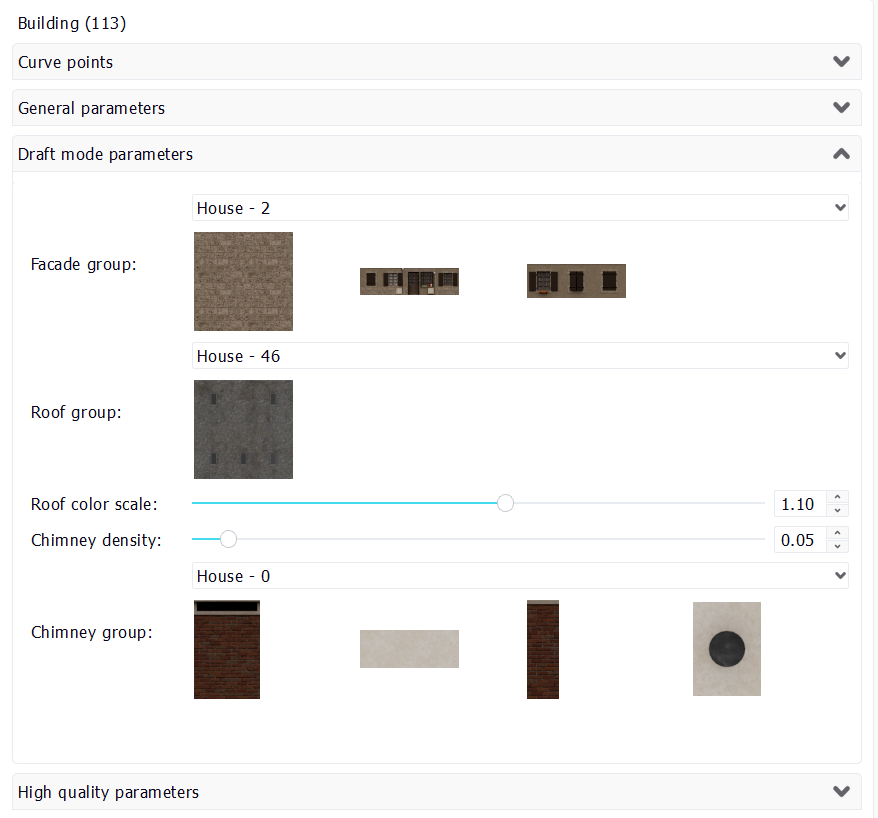
Note that the selection that can be applied to a building (this is specific to buildings) depends on the type of the building defined in the "general parameters" tab of the building. For instance a "house" kind of building should receive facades groups made for houses. If another facade selection is made, you'll be prompted to change the type of the building.
  Wizard Wizard | Buildings |
